;stroke-width:2px;'/%3e%3cpath%20d='M3,12L21,12'%20style='fill:none;stroke:rgb(38,166,219);stroke-width:2px;'/%3e%3cpath%20d='M3,18L21,18'%20style='fill:none;stroke:rgb(38,166,219);stroke-width:2px;'/%3e%3c/svg%3e)
Every call answered. Booked into Nookal.
Aeva answers your phone 24/7 and books, moves or cancels appointments straight into Nookal.
- Nookal API v3
- Australian Nookal accounts
- Set up with us on a demo call
Illustration: a returning patient calls and asks to see Sarah this week, and Aeva offers 9:30 tomorrow. When the call ends, the follow-up is saved to the Nookal diary.
Built on Nookal.
Live on every call.
Through Nookal's own API, on every call.
Recognises mobiles and landlines
Matched by mobile, home or work number, refreshed every 15 minutes.
Offers the times Nookal shows as free
Aeva only offers times that are genuinely open.
Writes back when the call ends
Bookings, moves and cancellations land in Nookal. Reminders keep running.
'%3e%3cpath%20d='M757.21,473.08C718.44,473.08%20688.85,503.43%20688.85,539.65C688.85,576.38%20714.61,606.48%20751.34,606.48C768.69,606.48%20782.46,599.59%20791.39,588.37L791.39,603.16L825.82,603.16L825.82,539.65C825.82,501.64%20796.75,473.08%20757.21,473.08ZM757.21,572.55C738.59,572.55%20725.07,557.76%20725.07,539.9C725.07,522.05%20738.59,507.25%20757.21,507.25C775.83,507.25%20789.6,522.04%20789.6,539.9C789.6,557.76%20775.83,572.55%20757.21,572.55Z'%20style='fill:rgb(6,39,91);fill-rule:nonzero;'/%3e%3cpath%20d='M963.3,536.34C963.3,501.91%20940.11,472.31%20900.06,472.31C861.05,472.31%20834.51,502.41%20834.51,538.9C834.51,541.68%20834.65,544.41%20834.93,547.05L963.3,547.05L963.3,536.34ZM899.8,503.93C912.87,503.93%20922.56,511.2%20926.08,521.44L872.62,521.44C876.75,511.35%20886.32,503.93%20899.8,503.93Z'%20style='fill:rgb(6,39,91);fill-rule:nonzero;'/%3e%3cpath%20d='M1063.05,476.9L1030.15,571.02L996.99,476.9L958.48,476.9L996.99,582.24C1002.86,598.56%201014.59,606.73%201029.89,606.73C1045.45,606.73%201056.42,598.57%201062.54,582.24L1101.56,476.9L1063.05,476.9Z'%20style='fill:rgb(6,39,91);fill-rule:nonzero;'/%3e%3cpath%20d='M1162.53,473.08C1123.76,473.08%201094.17,503.43%201094.17,539.65C1094.17,576.38%201119.93,606.48%201156.66,606.48C1174.01,606.48%201187.78,599.59%201196.71,588.37L1196.71,603.16L1231.14,603.16L1231.14,539.65C1231.15,501.64%201202.07,473.08%201162.53,473.08ZM1162.53,572.55C1143.91,572.55%201130.39,557.76%201130.39,539.9C1130.39,522.05%201143.91,507.25%201162.53,507.25C1181.15,507.25%201194.92,522.04%201194.92,539.9C1194.93,557.76%201181.16,572.55%201162.53,572.55Z'%20style='fill:rgb(6,39,91);fill-rule:nonzero;'/%3e%3cpath%20d='M901.97,579.31C887.84,579.31%20875.51,571.5%20869.03,559.98L838.44,559.98C846.45,587.51%20871.89,607.7%20901.97,607.7C932.05,607.7%20957.49,587.51%20965.5,559.98L934.91,559.98C928.43,571.49%20916.11,579.31%20901.97,579.31Z'%20style='fill:rgb(35,165,218);fill-rule:nonzero;'/%3e%3c/g%3e%3c/svg%3e)
What happens when a patient calls
- Record
- Nookal patient file
- Found by
- Phone number
Live in less than an hour
It starts with a short demo call, where we check your account and send your setup link.
- STEP 01About 10 min
Connect Nookal
Create an API client for Aeva in Nookal and paste in its Client ID and key.
- STEP 02About 30 min
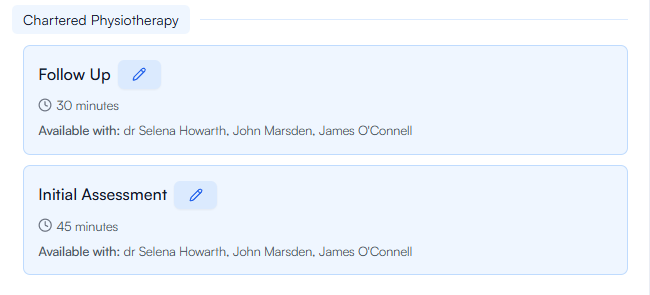
Choose what Aeva can book
Pick practitioners, services and booking rules.
- STEP 03About 5 min
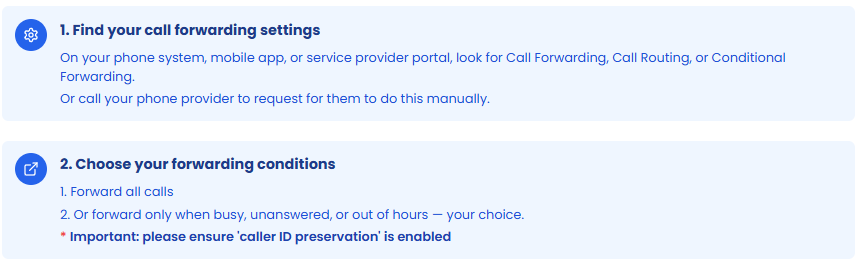
Forward your number
Forward every call, just overflow, or after hours.
Built to keep answering
Independent of your phones
Calls forward to a hosted number, so Aeva answers through internet or phone outages.
Never goes silent
If Nookal is unreachable, Aeva takes a message or transfers the call.
Data held in Australia
Recordings and transcripts stay in Australia. Leave, and all clinic data is deleted within 60 days.
Hear it from the clinics
Hear Aeva take a call
Tap to start. You're the patient.
Try“Hi, I've hur
Aeva and Nookal,
answered.
Through Nookal's API v3. In Nookal's API settings you create a client for Aeva, choose your locations and paste its Client ID and key into Aeva. Aeva works with Australian Nookal accounts, and Nookal Online Bookings needs to be on for each location Aeva books into.
Yes. Aeva keeps a list of your patients' mobile, home and work numbers, refreshed from Nookal every 15 minutes, and matches callers to their Nookal record so they're greeted by name. A new patient's number is recognised within about 15 minutes of being added to Nookal.
One-to-one appointments. Aeva books new appointments, cancels them, and reschedules an appointment to a new time at the same location for the same service, with the same practitioner or, if you allow it, a colleague. Nookal class bookings aren't supported.
Deposits, outbound calls, group classes, notes or transcripts written into Nookal, prices read from Nookal and reading out a cancellation policy aren't available for Nookal clinics yet. Each Nookal connection covers one Nookal practice.
Book a demo call. We check your Nookal account with you and send your setup link, and from there setup takes less than an hour with one-to-one help.
New patients get an SMS after the call confirming their booking, and your existing Nookal reminder settings keep working exactly as they do today.
Nothing changes for your callers. Aeva doesn't run on your clinic's internet, phone system or hardware — your clinic number simply forwards to a dedicated, cloud-hosted phone number (built on Twilio's global carrier network), and Aeva answers in the cloud. Your clinic's internet connection, Wi-Fi and computers can be completely offline and Aeva keeps answering and booking as normal.
Call forwarding happens at the carrier level, so Aeva keeps working through problems with your on-site phone hardware or phone system. In the rare case your carrier itself can't connect inbound calls, no receptionist — human or AI — could receive them either; the moment your carrier recovers, calls flow to Aeva again with no action needed from you. Aeva's own cloud telephony runs on Twilio, the same infrastructure used by banks, airlines and hospitals worldwide.
Aeva never goes silent. If your practice management system's API is briefly unavailable, Aeva keeps answering calls and falls back to what a great receptionist would do — taking a clear, detailed message or transferring the caller to your team per your rules — so no call is ever lost. Bookings resume automatically the moment the connection is restored.
Around fifty simultaneous calls — far beyond what any front desk could answer. During Monday-morning rushes, school-holiday peaks or marketing campaigns, every caller still gets answered instantly: no busy signals, no hold queues, no voicemail.
No. You keep your existing number and provider — going live is a single call-forward from your clinic number to your dedicated Aeva number, which takes about five minutes and works with any phone provider. Changing phone systems later doesn't affect Aeva either: you just point the forward from the new system.
Yes — because Aeva works via simple call forwarding, you decide exactly when it answers. Many clinics run Aeva as overflow (answering only what the front desk can't get to), after-hours only, or full-time. It coexists happily with human receptionists and any other phone services you use.
Let Aeva answer your next call
See Aeva book into a Nookal diary, then we'll set up your clinic.