Every call answered. Booked into Splose.
Aeva answers your phone 24/7 and books, moves or cancels appointments straight into Splose.
- Official Splose API
- Australian, New Zealand and UK accounts
- Live in less than an hour
Illustration: a returning patient calls and asks to see Sarah this week, and Aeva offers 9:30 tomorrow. When the call ends, the follow-up is saved to the Splose diary.
Built on Splose.
Live on every call.
Through the official Splose API, on every call.
Finds callers live in Splose
A client added this morning is recognised this afternoon.
Offers the times Splose shows as free
Aeva only offers times that are genuinely open.
Writes back when the call ends
Bookings, moves and cancellations land in Splose. Reminders keep running.

What happens when a client calls
- Last appointment
- Follow-up · Sarah K.
- Found by
- Phone number
Live in less than an hour
Same number, no new phone system, one-to-one help.
- STEP 01About 5 min
Connect Splose
Paste your Splose API key into Aeva. We email you before it expires.
- STEP 02About 30 min
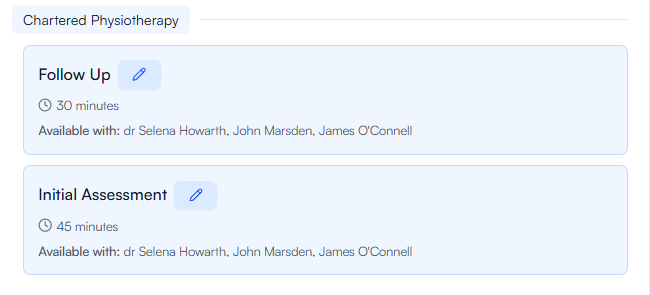
Choose what Aeva can book
Pick practitioners, services and booking rules.
- STEP 03About 5 min
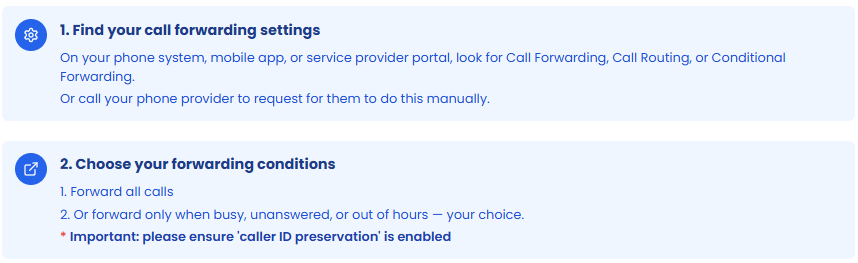
Forward your number
Forward every call, just overflow, or after hours.
Built to keep answering
Independent of your phones
Calls forward to a hosted number, so Aeva answers through internet or phone outages.
Never goes silent
If Splose is unreachable, Aeva takes a message or transfers the call.
Data held in Australia
Recordings and transcripts stay in Australia. Leave, and all clinic data is deleted within 60 days.
Hear it from the clinics
Hear Aeva take a call
Tap to start. You're the client.
Try“Hi, I've hur
Aeva and Splose,
answered.
Anyone whose phone number is on their Splose record. Returning patients are greeted by name and skip the details step. New callers are checked by name and date of birth before a record is created, which is how duplicates are avoided.
No. Aeva reads availability and writes bookings, reschedules and cancellations through the official Splose API. Renaming a practitioner or appointment type inside Aeva only changes how Aeva says it on calls; nothing in Splose is altered. Your existing Splose reminders and confirmations keep sending as before.
Times come straight from Splose. The two usual causes are an appointment type or practitioner that has not been added in Aeva, or a practitioner whose availability is not set for that type. The lead time set in Aeva ("Earliest appointment to offer" on Booking Rules, one hour by default) can also hide same-day slots. Check those settings first; if times are still wrong, send the call ID from your call logs and the team will investigate.
Prices are pulled from the cost set on each appointment type. Aeva only looks in your FAQs when no appointment type has a price. If a practitioner charges differently, list each practitioner's price in that appointment type's price field, such as "Dr A $120, Dr B $150". You can also replace the bare price with a sentence, such as "Our initial consultation is $120 and includes a full assessment".
Paste your Splose API key into Aeva during setup. You then choose the practitioners and services Aeva can offer, the earliest bookable time and the gap between offered times, and forward your number.
Splose keys expire every few months. Aeva checks the key regularly and emails you before it lapses, so you can add a new key before any bookings are affected.
Aeva cancels directly in Splose. If Splose blocks a cancellation, for example because the appointment has been invoiced or cancellations are switched off, Aeva emails your team to cancel it manually.
Yes. Payment is not taken on the call; after it ends the patient receives a secure Stripe payment link by SMS, and by email too if they have one on file. You set the amount and the time limit, and decide whether an unpaid booking is cancelled automatically.
Let Aeva answer your next call
See Aeva book into a Splose diary, set up your way.