Every call answered. Booked into PracSuite.
Aeva answers your phone 24/7 and books, moves or cancels appointments straight into PracSuite.
- Official PracSuite API
- Profession-aware booking
- Live in less than an hour
Illustration: a returning patient calls and asks to see Sarah this week, and Aeva offers 9:30 tomorrow. When the call ends, the follow-up is saved to the PracSuite diary.
Native PracSuite integration.
Knows who does what.
Through the official PracSuite API, on every call.
Finds callers live in PracSuite
Matched by mobile, home or work number, on every call.
Books from your Online roster
Aeva follows the hours you've already set in PracSuite.
Writes back when the call ends
Bookings, moves and cancellations land in PracSuite. Reminders keep running.

What happens when a patient calls
- Last appointment
- Follow-up · Sarah K.
- Found by
- Phone number
Live in less than an hour
Same number, no new phone system, one-to-one help.
- STEP 01About 5 min
Connect PracSuite
Add an API key with the four permissions we list. Aeva checks them before saving.
- STEP 02About 30 min
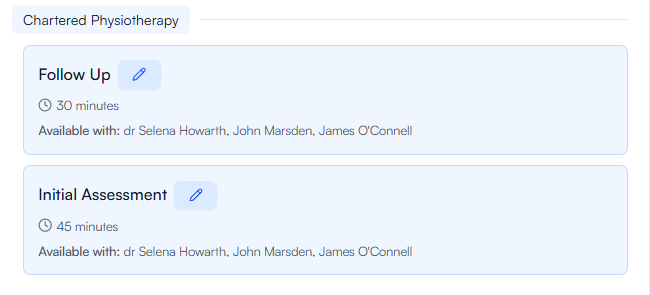
Choose what Aeva can book
Pick practitioners, appointment types and booking rules.
- STEP 03About 5 min
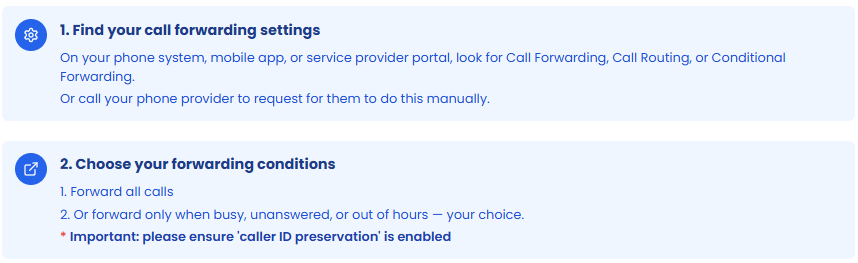
Forward your number
Forward every call, just overflow, or after hours.
Built to keep answering
Independent of your phones
Calls forward to a hosted number, so Aeva answers through internet or phone outages.
Never goes silent
If PracSuite is unreachable, Aeva takes a message or transfers the call.
Data held in Australia
Recordings and transcripts stay in Australia. Leave, and all clinic data is deleted within 60 days.
Hear it from the clinics
Hear Aeva take a call
Tap to start. You're the patient.
Try“Hi, I've hur
Aeva and PracSuite,
answered.
Anyone whose phone number is on their PracSuite record. Returning patients are greeted by name and skip the details step. New callers are checked by name and date of birth before a record is created, which is how duplicates are avoided.
No. Aeva reads availability and writes bookings, reschedules and cancellations through the official PracSuite API. Renaming a practitioner or appointment type inside Aeva only changes how Aeva says it on calls; nothing in PracSuite is altered. Your existing PracSuite reminders and confirmations keep sending as before.
Times come straight from PracSuite. The two usual causes are roster times that do not have Online Appointments ticked in PracSuite, or a practitioner whose availability is not set for that type. The lead time set in Aeva ("Earliest appointment to offer" on Booking Rules, one hour by default) can also hide same-day slots. Check those settings first; if times are still wrong, send the call ID from your call logs and the team will investigate.
Prices are pulled from the cost set on each appointment type. Aeva only looks in your FAQs when no appointment type has a price. If a practitioner charges differently, list each practitioner's price in that appointment type's price field, such as "Dr A $120, Dr B $150". You can also replace the bare price with a sentence, such as "Our initial consultation is $120 and includes a full assessment".
Enable API integrations in PracSuite, create a key with the four permissions Aeva asks for and paste it in. Aeva verifies each permission, then you choose which practitioners and appointment types it can offer and which practitioners deliver each type.
Yes. Aeva reads each practitioner's profession from PracSuite, so a physiotherapy request is only offered to physiotherapists. If more than one profession delivers the same appointment type, Aeva asks the caller which they would prefer.
Yes. Aeva can book, move and cancel a place in a PracSuite class, and PracSuite enforces the class capacity. Aeva does not create classes.
Yes. After the call the patient receives a secure Stripe payment link by SMS. You set the amount and time limit and decide whether an unpaid booking is cancelled automatically.
Let Aeva answer your next call
See Aeva book into a PracSuite diary, set up your way.